Upgrade your Windows 10 machine to Windows 11 smoothly with Flyby11! Flyby11 revolutionizes how you interact with Windows 11. Our advanced optimization tool enhances performance, customizes your interface, and unlocks powerful features that make your system faster and more efficient.
Flyby11 intelligently optimizes your Windows 11 system for maximum performance, reducing boot times and improving overall responsiveness.
Unlock hidden Windows 11 features and customize your interface beyond standard settings with Flyby11's powerful configuration tools.
Take control of your privacy with Flyby11's comprehensive privacy settings that help you manage data collection and system telemetry.
In the assets below, you'll find both Flyoobe (new) and Flyby11 (classic) so you can choose
Flyoobe is the next evolution of Flyby11. You can still grab the classic Flyby11 (upgrade only) if you prefer, or switch to Flyoobe for the full upgrade + OOBE/Tweak/Debloat toolkit. Same developer, same quality – just more options.
Discover the newest enhancements in Flyby11 that keep you ahead of the curve
Added support for Windows 11 25H2 - The app now runs smoothly on the new release with full compatibility and optimized performance.
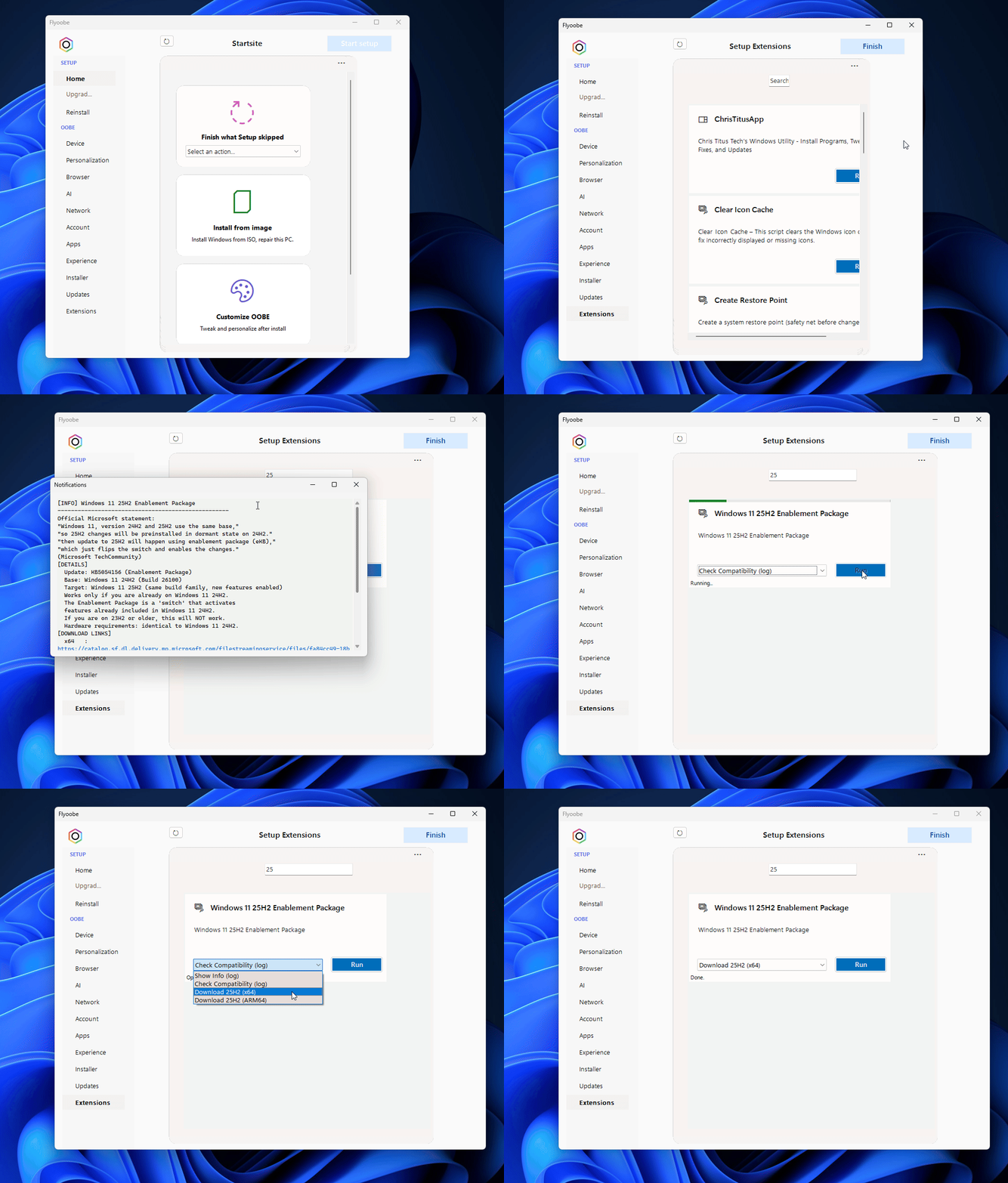
New extension script to upgrade to Windows 11 25H2 via the enablement package with info, compatibility check and download options. Find it under Setup Extensions > Windows 11 25H2 Enablement Package.
Setup extensions improved - Script output can now be viewed in the internal log window for better debugging and monitoring of extension processes.
New Flyoobe icon added to the main UI (top left) - click to open app info & settings. Extension management moved to the More menu (top right) for easier access.
Many systems are already ready for the 25H2 update without requiring a full ISO upgrade. Our new enablement package provides a simple way to activate 25H2 for compatible systems.
Flyby11 has been tested by thousands of users worldwide, delivering consistent performance improvements and system optimization results.
Our tool is completely safe to use, with built-in safeguards and backup options to ensure your system remains stable throughout the optimization process.
Flyby11 receives regular updates to stay compatible with the latest Windows 11 features and security patches, ensuring optimal performance.
Designed with simplicity in mind, Flyby11 offers an intuitive interface that makes system optimization accessible to users of all technical levels.
"Flyby11 transformed my Windows 11 experience completely. The performance boost is incredible, and the customization options are exactly what I needed."
"Finally, a tool that actually delivers on its promises. Flyby11 made my older laptop feel like new again with Windows 11 running smoothly."
"The privacy features in Flyby11 are outstanding. I have complete control over my system's data collection and telemetry settings."
Find solutions to frequently encountered **Flyby11** problems and technical challenges
**Flyby11** fails to detect TPM 2.0 module on certain motherboards
**Flyby11** unable to bypass Secure Boot on UEFI systems
**Flyby11** shows incompatible CPU error for supported processors
**Flyby11** Windows 11 installation freezes during upgrade process
**Flyby11** cannot modify Windows registry for compatibility
**Flyby11** upgrade causes driver conflicts on older hardware
System enters boot loop after **Flyby11** Windows 11 installation
**Flyby11** upgrade results in network adapter not working
Windows activation fails after **Flyby11** upgrade process